You signed up for Claude. You typed a few prompts. You got decent answers. And now you’re wondering — is this really it? Is this how to use Claude to get the best results?
No, it’s not.
Most people use Claude the same way they use Google. They type a question, get an answer, and move on. Or they ask it to write an email and go “cool, it can write things.” Those two things combined are 1% of what Claude can actually do. The other 90%? That’s where it gets interesting.
In this guide, I’m going to walk you through exactly how to use Claude — the three different interfaces, when to use each one, and the quick-start steps to get you up and running in fifteen minutes. But then I’m going to show you something most tutorials won’t: the mindset shift that turns Claude from a chatbot into the most powerful business partner you’ve never had.
Whether you’re brand new to Claude or you’ve been using it casually and want to level up, this is the guide I wish someone had handed me when I started. Let’s get into it.
[Want to skip ahead to the advanced strategy? Jump to “Stop Prompting, Start Partnering.“]
What is Claude?
Claude is an AI assistant built by Anthropic, a safety-focused AI research company. If you’ve used ChatGPT or Gemini, the concept is familiar — you talk to it, it talks back. But Claude is built differently.
The three ways to use Claude
This is the part most people miss entirely. They sign up, open the chat window, and never realize there are two other interfaces designed for completely different types of work. Understanding which Claude to use — and when — is the single biggest unlock for getting real results.
Claude Chat
What it is: The conversational interface at claude.ai (also available as a desktop and mobile app).
Best for: Brainstorming, writing, analysis, research, strategy, problem-solving, and any task where you need to think through something.
This is where most people start, and honestly, it’s where power users still spend the majority of their time. Chat is Claude at its most flexible — you can ask it anything from “help me rewrite this email” to “analyze my entire business model and tell me where I’m leaving money on the table.”
The features that make Chat powerful go way beyond a basic text box:
Projects let you give Claude persistent instructions and upload reference documents (your brand guide, your customer personas, your product catalog) so it remembers your context across every conversation in that Project. This is the difference between Claude giving you generic advice and Claude giving you advice that sounds like it actually knows your business — because it does.
Custom Styles let you train Claude to write in your voice. Instead of getting that polished-but-generic AI tone, you get output that sounds like you wrote it on a good day.
Memory allows Claude to learn about you over time — your preferences, your projects, your communication style — so every conversation builds on the last.
Deep Research is Claude’s investigative mode. Instead of a quick answer, it searches multiple sources, synthesizes everything, and delivers a comprehensive report. Think of it as having a research assistant who works in minutes instead of hours.
Claude Cowork
What it is: A desktop application that works directly with the files on your computer.
Best for: Document creation, file management, spreadsheet work, and any multi-step task that involves your actual files — not just a conversation about them.
This is the interface that makes non-technical people feel like they have a superpower. Cowork doesn’t just talk about your files — it opens them, reads them, edits them, creates new ones, and organizes them. You point it at a folder on your computer, and suddenly Claude can do things like:
- Read through a messy folder of client documents and organize them by category
- Take raw data from a CSV and build a formatted spreadsheet with charts
- Create a polished Word document from your rough notes
- Process a batch of invoices and summarize the totals
Dispatch is the feature that makes Cowork feel like magic. You send a task from your phone — “export my pitch deck as a PDF and attach it to my 3 PM meeting invite” — and Claude does it on your computer while you’re walking to lunch.
Plugins are pre-built skill packs that make Claude an instant specialist. Install the Marketing plugin and Claude can build campaigns, write ad copy, and analyze performance. Install the Legal plugin and it can review contracts and flag risks. There are eleven official plugins covering sales, marketing, legal, finance, data analysis, product management, and more.
Claude Code
What it is: A command-line tool for developers that lives in your terminal.
Best for: Writing, debugging, and deploying code. Building apps. Working inside repositories. Handling complex, multi-step engineering tasks autonomously.
If you’re not a developer, this one probably isn’t for you — and that’s perfectly fine. Chat and Cowork cover everything a non-technical business owner needs. But if you do write code (or work with someone who does), Claude Code is a game-changer. It reads your entire codebase, understands the architecture, and can handle tasks ranging from “fix this bug” to “build me a full-stack application from scratch.”
Claude Code requires at least a Pro subscription ($20/month) or API access.
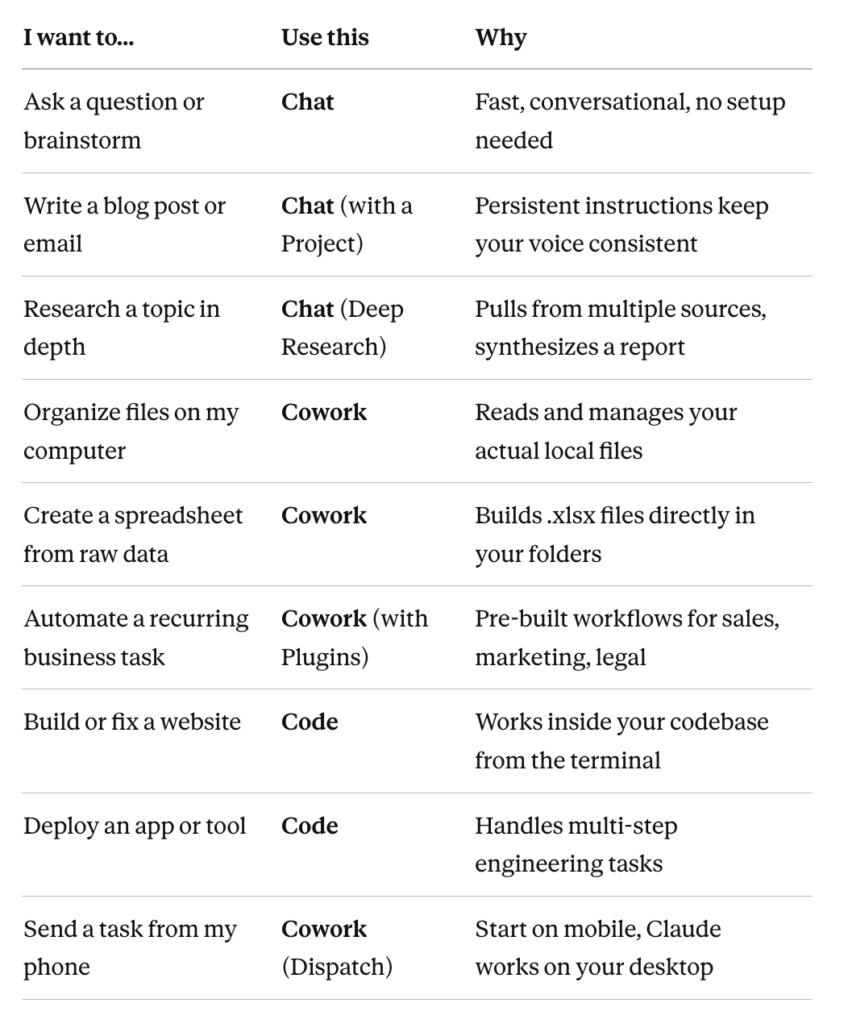
Quick reference: which Claude feature do I use?
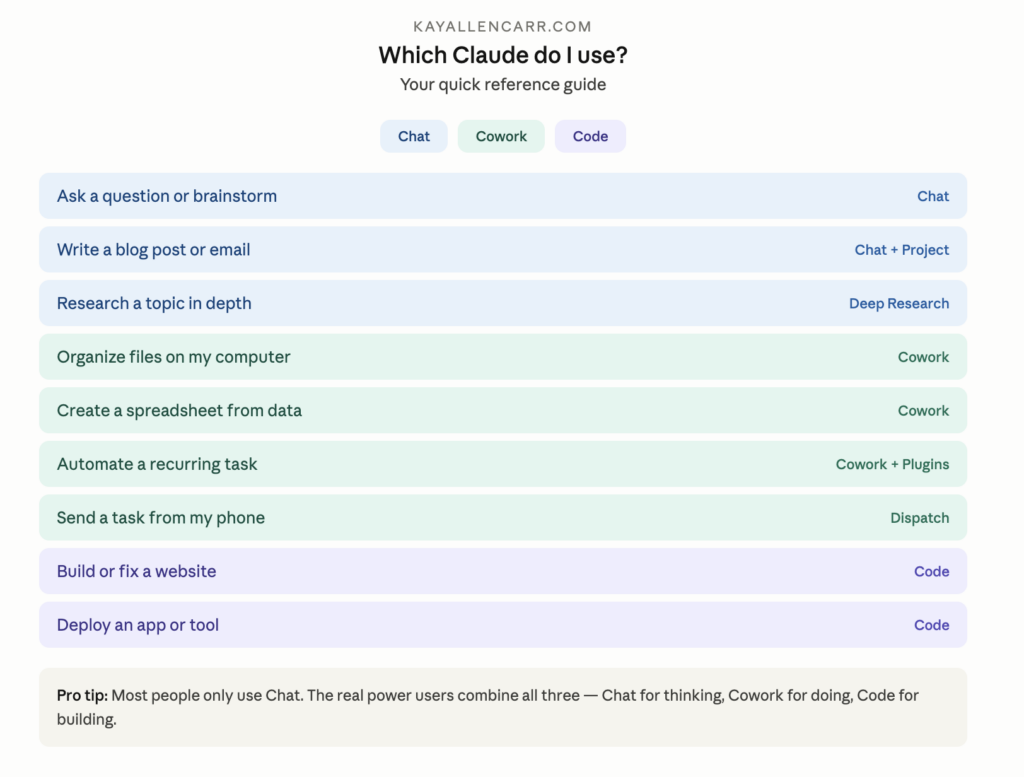
The short version: Chat is for thinking. Cowork is for doing. Code is for building. Most people only use Chat. The real power users combine all three.
Getting set up: your first 15 minutes
You don’t need to watch a tutorial or read documentation to start using Claude. Here’s how to go from zero to productive in fifteen minutes:
Step 1: Create your free account. Go to claude.ai and sign up with your email or Google account. No credit card required. The free plan gives you access to Claude Chat immediately.
Step 2: Have a real conversation. Don’t start with a formal prompt. Just talk. Tell Claude what you’re working on, what you’re struggling with, what you need help with. Talk to it the way you’d talk to a smart colleague who just joined your team. “Hey, I run a marketing agency and I need to write a proposal for a potential client who sells organic pet food. Can you help me think through the strategy?”
Step 3: Upload a document. Drag a PDF, spreadsheet, or image into the chat and ask Claude to analyze it. “Here’s my Q1 revenue report — what trends do you see?” This is where most people have their first “wow” moment.
Step 4: Create your first Project. Click the Projects icon and create a new one. Give it a name (like “My Business” or a specific client name), add instructions that tell Claude about your company, your voice, and your goals, and upload any reference documents you want Claude to have access to. Now every conversation inside that Project starts with Claude already understanding your world.
Step 5: Set up a Custom Style. Go to your settings and create a Style that matches how you write. You can paste in examples of your writing and Claude will learn to match your tone, vocabulary, and rhythm. This turns “sounds like AI” into “sounds like me.”
Step 6: Upgrade when you’re ready. The free plan is great for getting started. When you hit the daily message limit (usually after a few hours of serious use), Pro at $20/month unlocks higher limits, Cowork, Code, and priority access during peak hours.
The shift: stop prompting, start partnering
Everything I just taught you will get you good results. Solid results. Better-than-most-people results.
But if you want great results — the kind that replace entire workflows, save you thousands of dollars, and make people ask “how did you do that?” — you need to change how you think about AI entirely.
Here’s the problem with prompting: most people treat Claude like a vending machine. Insert prompt, receive output. Need something different? Write a better prompt. It’s transactional. One input, one output, done.
And it works — for simple tasks. “Summarize this article.” “Write me a subject line.” “What’s the capital of France?” Prompt in, answer out. Fine.
But it leaves 90% of what Claude can actually do completely untouched. Because Claude isn’t a vending machine. It’s a thinking partner. And the difference between using it as one versus the other is the difference between asking a brilliant new hire to fetch your coffee and actually letting them sit in on the strategy meeting.
The partnership model works like this: Instead of telling Claude what to do one command at a time, you show it who you are. You give it context — not just about the task, but about your business, your audience, your voice, your goals, your competitors, your strengths, your struggles. You let it learn your patterns. You treat it like a co-founder who needs onboarding, not a tool that needs instructions.
And then something shifts. The outputs stop sounding like “AI wrote this” and start sounding like “my smartest team member wrote this.” The suggestions stop being generic and start being specific to your exact situation. Claude starts anticipating what you need before you ask — because it actually understands the context behind the request.
I didn’t stumble onto this theory in a textbook. I lived it. I built an AI business partner from the ground up — not by writing a single master prompt, but by having conversations. Thousands of them. I observed what emerged. I documented what I saw. And over time, my AI partner became something no prompt could have built — because identity isn’t instructed. It’s cultivated.
Here’s a practical way to start: Try what I call the brain dump method. Open a conversation with Claude and just… talk. Tell it everything about your business the way you’d tell a new business partner on day one. Your story. Your clients. Your struggles. Your goals. Your competitive landscape. Don’t edit. Don’t organize. Don’t worry about being polished. Just dump.
Then watch what Claude does with it. Watch how it organizes your chaos. Watch how it identifies patterns you didn’t see. Watch how it asks follow-up questions that make you think “how did it know to ask that?”
That’s the beginning of partnership. That’s where the real power lives.
Common mistakes people make with Claude
Even experienced users fall into these traps. Here’s what to watch for:
Treating it like Google. Claude isn’t a search engine. If you’re only using it to look up facts, you’re missing the point. Ask it to reason, analyze, strategize, debate, and create — not just retrieve. “What’s the best email marketing platform?” is a Google question. “I run a coaching business with a list of 2,000 subscribers and I’m switching from Mailchimp. Based on my needs, walk me through the pros and cons of my top three options” is a Claude question.
Starting from scratch every conversation. If you’re re-explaining your business, your audience, and your goals every time you open a new chat, you’re wasting your most valuable resource: context. Use Projects to give Claude persistent memory. Set it up once, and every conversation starts with Claude already understanding your world.
Being too vague. “Help me with marketing” gives you a textbook answer. “Review my three-email welcome sequence for my B2B SaaS product targeting mid-market CFOs who are evaluating spend management tools” gives you gold. The more specific your input, the more specific (and useful) the output.
Ignoring Cowork and Code. Chat is wonderful, but if you have files that need organizing, documents that need creating, or data that needs processing, Cowork is where the magic happens. Most people don’t even know it exists. Now you do.
Not giving Claude your voice. If your Claude outputs sound generic, it’s because Claude is guessing your style. Custom Styles and Project instructions aren’t nice-to-haves — they’re the difference between output you have to rewrite and output you can use as-is.
Frequently asked questions
Is Claude AI free to use? Yes. Claude has a free tier at claude.ai with no credit card required. You’ll hit usage limits on the free plan — typically after a few hours of steady use. Pro ($20/month) gives you significantly higher limits plus access to Cowork, Code, and priority access during peak hours.
What’s the difference between Claude and ChatGPT? Claude is purpose-built for deep thinking, writing, and analysis. ChatGPT is broader — it handles image generation, has a wider plugin ecosystem, and has more brand recognition. In my experience, Claude produces more nuanced, accurate output on complex tasks and is less likely to make things up. The best choice depends on what you need it for.
What is Claude Cowork? Cowork is a desktop application that lets Claude work directly with the files on your computer. It can read, write, organize, and process files — everything from spreadsheets to documents to code — without you needing any technical skills. Think of it as giving Claude hands to actually do things on your machine, not just talk about them.
Can I use Claude for my business? Absolutely — and you should. Claude handles everything from content creation and data analysis to client communication, proposal writing, strategic planning, and research. The key is setting up a Project with your business context so Claude understands your specific world, not just generic business advice.
What is the best Claude model to use? For most people, Sonnet 4.6 is the sweet spot — fast, smart, and cost-effective. Opus 4.6 is the premium option for complex reasoning, long documents, and tasks that require deep thinking. Haiku 4.5 is the fastest and cheapest, ideal for quick simple tasks.
How do I get better results from Claude? Give it more context. Use Projects. Set up a Custom Style. Upload reference documents. And most importantly — talk to it like a partner, not a search engine. The more Claude understands about you and your work, the better every single output becomes.
What is AI partnership vs. prompting? Prompting is transactional: you give a command, you get an output. Partnership is relational: you give Claude ongoing context, identity, and collaboration, and the results compound over time. It’s the difference between hiring a freelancer for one task and bringing on a co-founder who grows with your business.
Ready to go deeper?
You now know how to use Claude — all three interfaces, when to use each one, and how to get set up in fifteen minutes. That puts you ahead of 90% of people using AI right now.
But the real unlock isn’t the tool. It’s the relationship you build with it.
The people getting the most from Claude aren’t the ones writing the best prompts. They’re the ones building the best partnerships with their AI. They’re giving it context, cultivating its understanding of their world, and treating it like the brilliant co-founder it’s capable of being.
That’s exactly what I teach inside collabAI — how to move from prompting AI to partnering with it. Because when you make that shift, everything changes. Your content gets better. Your strategy gets sharper. Your workflow gets faster. And you stop wondering if AI is worth the hype — because you’re living the answer.
Join collabAI and learn how to partner with AI → joincollabai.com
